How to Estimate Your PPC Cost

Posted by babybrownfox | 5:19 AM | | 0 comments »

Getting a lot of traffic to your site wasn't that easy at all and it takes a lot of work. It doesn't happen in a snap or just a click - it never works that way. However if you have the right niche and keywords to your site or blog this would make a big difference driving traffic to your site.

Although I've mention many ways how to drive traffic to your site that is from social bookmarking, submitting to directories and becoming active to forums discussions and social sites, and also I've mention ADWORDS on the process for advertising your site. Have you gone through PPC Advertising this? If not lets go through on estimating your cost on PPC advertising. If you have the niche then its time to break it down into categories it. Take this for example a CELLPHONE. Its a broad one because they are many cellphones in the world. However if you break it down, it may seem to be easy.

CELLPHONE
Nokia
- N95
- N96
- N...
Sony Ericson
- List some known phones


If you have listed some popular items then its time to get some keywords and estimate your cost. I would suggest that you choose keywords that are very very cheap and keywords that are mispelled. Now to get some ideas from keywords you can use the ADWORDS KEYWORD TOOL.
Just simply visit the site and type a phrase on the textbox that matches to your niche. The keyword tool will now generate a list of keywords that will automatically give you the estimated CPC or Cost-Per-Click of each keyword. You can narrow down the list by simply entering the amount of money you would like to spend on each keyword. Take a look at the image below.


ADWoRD Keyword Tool (Estimating your cost)

Grab as many keywords as you can that fits to your budget. Once you've chosen your keywords, the next step is to set the amount of money you would like to spend in a month and ADWORDs will not take more than on that budget.

If you are new to internet, choose ADWORD STARTER kit first, once you're savvy enough you can venture through to STANDARD EDITION which you can use the full range of AdWords features and functionality: advanced bidding options, multiple campaigns, conversion tracking, and more.

Experiment on different keywords and if you're primary source of income is from Adsense make sure that ADS are displayed well like this site.

You can also try using the Yahoo Search Marketing Tool which you can also estimate your PPC cost.

Make Extra Bucks Clicking ADS

Posted by babybrownfox | 2:06 AM | | 0 comments »

Alright, its December and it should be fun but today I really don't feel like going out with friends. I figure out having fun on clicking ads to my PTC site just to have something to do but hey, this isn't just clicking without making money. Its a PTC or PAID TO CLICK program - so for a few clicks I get a few $$$ and more earnings for more referrals.

I won't dragged you to join me here but hey many members are making extra bucks from it that's ofcourse if you make a lot of referals and do the same thing you do - that is clicking ADS everyday. It only takes a few seconds to view ADS and be awarded for each views. If you think you need something to do then try out clicking few ADS.

You may need to create an account for an ALERTPAY or PAYPAL - these are online payment processor that PTC sites sends out their payment.

Here are some PTC sites that will add another flow of extra bucks to your pocket.

1. LINKGRAND - a profit sharing internet advertising company that will pay you to visit the advertiser's websites and they offer its members $0.003 per click, you get rewarded 30% of the total earnings from your referred member, 10% if you refer advertiser that makes a purchase, and real time stats of your earnings. However LinkGrand doesn't have enough ADS to click. You may have 2 - 5 ADS to click everyday. Anyways, if you could refer some friends to sign up under your link then you might just make $1 per day or more. Will this sounds good for FREE other than doing nothing. :)

2. WORDLINX - members are paid $0.01 per click for each ADS they visited. If you refer new members to WordLinx you can earn 5% of their earnings from clicking ADS and 5% if they purchase. Another great thing of this PTC site is that you earn $0.50 each new member you refer and upto 3 level deep. Again the only drawback is that you only have a few ADS to click.

3. NEOBUX - you earn $0.02 per click you made and from your referal. The website is quite different from other PTC site. Payments are through paypal and alertpay.

4. ROUDYCASH - currently roudycash rates are $0.01 per each click and $0.005 per each your referral click. Members that are actively joined roudycash are 30,479. I like the site because of its professional looking and a very unique way of motivating members. If you are a team oriented guy then you might enjoy this one as a team leader.

5. TakeTheGlobe - plenty of ADS to click and making money with them is fast. Get more active referrals or buy referrals from them.


TIPS: Refer more and more member using your referal link. The more you refer the more you earn.

Would you like to know how you could build and grow your MLM business without having to spend anything from advertising and marketing? Read along..

Dr. Steve is one of my network that has been sharing real information in many ways how he build his own network and helping his downlines achieve what he has earn. Though his profession makes him a lot of money but yet the Doctor has earn cash not only by his profession but also through his lifetime online business.

As I read along the information he has been sending me through emails, it had given me a clear idea on how to increase more of my network and the network of my downlines however not every time it works but it's worth a try though.

Email marketing is one of the many ways to build your online business and indeed it has been proven and tested. What I've learn from Dr. Steve from one of his emails, is how to get free opt-in emails from FREEFFAS - there are one of the biggest marketing portals for your online business and they are giving you free opt-in emails every month. So how to get them is by simply signing up a free account but be sure not to use your own personal email - be wise to make an extra email addresses from yahoo.com and use this to sign up for FREEFFAS account.

My first online business that I started a few years ago is an email coming from a friend who invited me to join an MLM business called Global Domains International or GDI. The 7 minutes animation explains a little bit about the business and how the members generate passive income. The second video they release was on the DVD which was also viewable through an online website from a members unique website address. However from those videos, GDI has not covered how members gets $100 bonuses from every 5 referrals. So if a member referred 15, he can get $300 as bonus. You might want to check it out on their website.

What GDI is selling is a Domain Name with Dot WS extension rather than dot COM which is now flooded throughout the net. This is what we called internet address or website address which can be your name or anything that is not yet taken or own by others yet. For example your name is JenelynLee - you could have an internet address like www.jenelynlee.ws for life. Now people can find you easily using the website address which is your name, however, an address can be anything like an online business or just for fun website (eg. www.jerseyshops.ws or www.funnytummy.ws ). If you wish to watch and learn more about GDI please turn on your speakers and CLICK HERE TO START THE VIDEO.

Now if you have set up your online business, its time to get you started on how to use the emails from FREEFFAS. The videos below will demonstrate how to do it. Always remember to play safe when sending out email messages to your recipient. A good and safe way is to send the recipient a personal email asking them if they wish to learn more about what you offer to them. When they approve, you can send them an invitation email with your business link. In GDI, they uses a simple and efficient invitational system. The system sends an email inviting your recipient to watch the video with your own unique tracking link on it so that whenever they sign up, it goes to your benefit not from any other members. A total of seven email messages and that is one for each week will be sent to your recipient which will contain the income opportunity behind GDI. Its an article that gives your recipient the nature about the business and how they could be earning a stable financial lifetime income. Again to learn to more about them is by simply visiting their website or my own unique referal address. CLICK HERE.

If you have sign up for FREEFFAS account, just simply log in to your FREEFFAS account, please click FFASLEADS once only then copy and paste those emails to your Microsoft Excel Office program. Take a look at this video. Remember to only click the FFASLEADS once or else you won't gonna get anything once you refresh your browser.


After you've copied those emails, take time cleaning it up by taking out those bad emails and delete them. For example delete emails that you think that do not sound that someone really cares about like adsmarketing@yahoo.com, advertisingcap@yahoo.com - just anything like that. Now remain only emails that would be like with their name on it. For example margaretompad@yahoo.com, mikedannely@yahoo.com - these are good prospects.


Once everything is cleaned up, you may now send emails to your recipient inviting them to any business you would like to offer to them. As of now, the last video demonstrates below is from GDI invitational system. Enter a maximum of 100 emails per day. Checkout the video.


The GDI invitational system takes care of everything for you and the video itself does makes the selling. An important thing also in any MLM business is to take time in communicating with your downlines or members. Sharing ideas with other members will increase the maximum potential of your business. It may not affect immediately but as the learning process goes on, your members will eventually move and grow there business, thus grows yours too. For more ideas on GDI marketing, you can visit www.gdi-made-easy.ws - I do not own or have any contact of the owner of that website. For the sake of learning especially on newbies, that website will give you thorough discussions. Sample email message and phone script is available on that site.

For those who are interested to venture in online business. I WISH YOU A SUCCESSFUL BUSINESS VENTURE!!!

Are you an entrepreneur and want to start your own business but can't start because you don't have the CASH or ITEMS to sale? If you are damn lazy like me who don't like tracking inventories and counting it off manually, then you might just want to try out AMAZON.com - absolutely FREE.

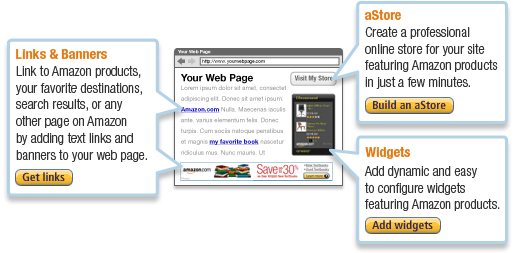
You could become one of their associates and earn extra bucks by referring products to your online consumers. That's right, many associates are making really good money from AMAZON from their FREE ONLINE Store - your own shopping cart that AMAZON take cares of it for you - nothing for you do but to watch your earnings grow. How's that sound - cool right? You could have your own Online Store and don't have to worry on inventories or other tedious item managing stuffs like that.

Checkout this sample ONLINE Store. Its a PSP Games and Accessories shop and its powered by AMAZON. You can choose which product you would like to appear on your ONLINE Store. It also provides complete description about the product and customers review and feedbacks. Once they like to purchase the product they could simply click ADD TO SHOPPING CART and everything is taking care of by AMAZON. OFCOURSE you get your money share of the product you sold out from your ONLINE Store using unique tracking ASSOCIATE ID that keep tracks all the products you sold - you could earn upto 15% referral fees and without a sweat.

What is AMAZON ASSOCIATE PROGRAM?
Alright Amazon Associate program was launched 1996 and they are the first online affiliate marketing program. Amazon Associate Program develops marketing solutions to help many website owners, developers and bloggers to make money by advertising millions of new or used products from Amazon.com and Endless.com. It really simple and easy to join.

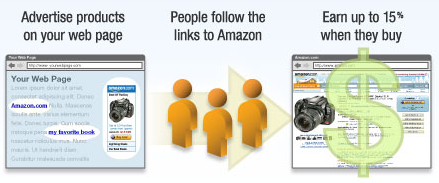
Provide customers the convenience of referring them to a trusted site where they can immediately purchase the products you advertise on your site. And when they do, you can earn up to 15% in referral fees.
Okey, okey... show me how... You can't be wasting my time reading all this blablabla... Lets get it on...

  1. Assuming you have your own website or blog then you can just simply sign up for a free account at http://www.amazon.com - Go ahead and make it fast. Now incase you don't have your own website or blog, create one from www.blogger.com - then paste some free article stuffs from http://www.articleset.com/ - for FREE Blogger Template try this Business Blue Template.
  2. Now once your done filling up the blanks, you may have to sit down wait for the approval of your application - it usually takes a day before it can be approve - so hold still.
  3. Once approved, go ahead and start customizing your own online store. You can choose on many different colors you like and choose what products you want to appear.
  4. Once your satisfied by the result - you can now select from different codes you like - a Direct Link - its a direct URL to your online Store. Next is the IFRAME - it uses iframe tags and you can place them directly in your blog post. Try it!!!.
  5. Use widget and embed them in your social networking site. I found out that Friendster.com is a friendly site for widgets. You should take advantage of it.
  6. Now if your serious about on making the big bucks, try out Google Adwords for your advertising campaign solution. This will cost you a few bucks so bid at the lowest keyword first.
  7. Another way to increase your potential earning on Amazon is through HUBPAGES. If you haven't heard of it, you should try it and start writing reviews on certain products. Its fun and makes a good income too.
  8. There are a lot things to drive traffic to your blog site. So whatever you think of - just try it.
Now you have the idea of coming up your own online store, perhaps you would also try to register your own domain name like www.youronlinestore.com. You can try out www.namecheap.com for a really really cheap domain name registration. You better hurry before someone else gets it first.

Monetize a Simple Widget

Posted by babybrownfox | 3:16 AM | | 0 comments »

Last week I had this idea of making my own widget but the thing is I have little knowledge on programming stuffs on Javascript and Ajax, although I had a thing on HTML and little CSS stuffs. However this doesn't stop me on trying what I want to achieve. My idea of a widget is to create one that would show up Google ADS below the application. I thought of it as simple and after a few experiments I was able to build one. Its pretty much easy, fun and ofcourse adds a little traffic for my ADS - thus potentially making extra earnings from it.

Making these widgets and displaying Google ADS is by far not against the policy of Google ADS as long as you don't put "Click Here" pointing to your ADS. If you have doubts you may want to send Google an email clarifying these issues. However many developers had come up with widgets along with Google ADS - I think they have made thorough research about these issues before they start building those widgets - don't you think so?

Making gadget is easy and you have all the guide you need to build one. Honestly there are simple ways to do it - if you look into some widgets on Google Gadget Directory you'll find out that some widget that are pre-made and that some authors just added Google Adsense below it. - Clever isn't it? Search for widget Imeem or mp3, video playersand you'll see what I mean.

The Google Gadget Editor is a great tool for you to create you're own widget - you have sample code to experiment with it - like the first you'll need to look into is the HELLO WORLD example.
It's a good thing to start your learning on simple html and then proceed to javascript. It really doesn't matter if your an expert or not because you got all the guide you need to know.

Once you made one Gadget, you can submit it to social networking sites that supports Opensocial coding. A good example that is provided is Orkut, you'll find it easy as it is simply described thoroughly. You can check out more about Opensocial coding on Google - Things you need to get started are provided for you.

On my previous article I wrote about how you make money from Google Adsense on your Blog. Indeed it was a good way to make money on it without investing a single penny, however many of you still having difficulty generating traffics on your blog or site. So if you don't generate enough visitors, how will you generate enough earnings. Would you like to try writing reviews and make money from $10 to $1000 or even more if your blog has more visitors and becomes popular.

If you haven't heard that writing reviews makes money on your blog, now you might want to check and try it out.

So how do you make money from writing reviews?

Perhaps you might think its difficult to do it, but fortunately it isn't (piece-of-cake). Assuming that you already have your blog and it's been around for at least 3 months and contains at least 10 real content post, then you just simply sign up for free account on one of the paid to review sites. This won't really take long and infact it takes only a matter of seconds to finish the sign up. By the way, you need to have an active Paypal account, if you don't have one yet - sign up for free.

Once you're done, just simply submit your blog and wait for the approval. If you successfully been approved, you can sit down and wait for Advertisers to buzz you or if you want to quickly make money - just simply browse in the marketplace and find advertisers. Look for reviews that are related to your blog so that it is much easier for you to make money. If you have spotted one, you can simply apply for it and wait for Advertisers approval. Once your application is approved, advertisers may give you additional requirement or special instructions to make review. Just follow them all and after that, you make money. It isn't really simple?

Alright so, how much money I make?

Many bloggers on SponsoredReviews makes $10 or more per review. You can also set you're own price per review, alright this sounds nice, but really my advice is don't set it too high especially when you're just starting. Write reviews with high quality and honest content - this is the best thing I love about it, is writing an honest review. So are you ready to make money on writing reviews? I bet you do now.

I highly recommend that you sign on these two Paid to Review Sites:

  1. SponsoredReviews
  2. PayperPost
Many bloggers have tried it and make a descent income from writng reviews, so there's no reason you can't.

Shareapic has been around for a quite sometime now and it keeps on improving every now and then for new ways for its members to earn money by sharing there pictures. Shareapic is a totally free service that allows its member to upload unlimited pictures and create albums on it. What makes Shareapic different from any other free photo hosting site is the ability to award its members to take part of the income that Shareapic are generating through advertising.

Members earn based on the number of views the pictures generated. This is not easy for beginners to earn huge amount of money through Shareapic due to its very small amount of share they give. But based on the many top earners on Shareapic they have generated more than $100 a month, now thats really heavy traffic. They say that you need to have atleast 100 referred members on your network that are actively using Shareapic and that they generate lots of views of there pictures.

I do have not more than 15 referred members which I personally thought, other 20 members who sign up under my banners, those members I have so far generate a enough views per month that makes me earn $22. Not bad for a free service and free passive income.

If you're interested to make extra money from a simple free photo service, take a moment of signing up a free account. You need also Paypal account which is ofcourse is free but if you already have, no need to sign up a new one because Shareapic pays you through Paypal and nothing else.

How to generate viewers to your Pictures.

  1. You may send your photos through email by embedding the codes generated by Shareapic.
  2. Paste codes to your Blogs, Website and to the Social Networking you're a member off.
  3. You may also use those codes on Ebay and other buy and sells sites which allows you to embed pictures and photos.
  4. You may send it as comments to Social Networking site you're member off.
  5. Submit your blogs or websites containing pictures and photos to social bookmarker sites. You can try out www.socialmarker.com to submit it in one single site.
  6. Tell your friends about this and let them try it and use it as their photo sharing sites. It's really easy and its fun. Don't forget to let them sign up using your own referral link which looks like this http://www.shareapic.net/ref.php?owner=ezdollarincome (make sure to change ezdollarincome to your own USERID/Username). You get %10 of their total views, remember the more you refer the bigger you can make money.
  7. Create videos containing your link of your blogs and websites to tubemogul.com - it'll blast your video to all video hosting site.
  8. Make reviews on Ezinearticles.com, ArticleCity.com and other free write up article site where you can put your link of your blogs and websites.
  9. Embed Shareapic banners to your blogs and websites.

If you’re still struggling to reach that $1 from your Adsense then you really mess up. It maybe because you’re not working on it or you’re doing it the wrong way. Is it really hard to build that money from Adsense? well ofcourse its not easy because when I first started it I totally mess up and wasted so much time. But then as the learning process goes by I begin to learn some few unlikely tips that actually make money on Adsense.

Here are some unlikely tips that make you earn good money from Adsense.

  1. When writing something on your blog, try to post that actually doesn’t give thorough information about the subject. Write anything blah-blah and blah-blah on your post but let your readers hangs all the while after reading. Since your blog is not informative, you’re readers will intend to look for another link, and that point your Google ADS shines. They would certainly click on it. I ask you, how many times did you click ADS from that kind of content?
  2. Blogging is fun and sometimes can be so addicting, so if you happened to be an addict and had posted plenty, like 90 posts then you should stop writing on that blog and start a new one. I tell you your Cost-Per-Click will certainly raise as well as your money from Adsense.
  3. They say that a good way to earn that money from Adsense is to blend your Adsense on your content or make it navigational (something like a menu). Well, I certainly follow that one, but the thing is, this is not enough. One stupid way to earn clicks is making your content or post almost seems impossible to read. Try blending font on your blogs background color and the only seems to stand is your ADS. Isn’t it clever? Try it, these actually works.
  4. Try not to check your Adsense earnings everyday because sometimes this could be discouraging to look at when your earnings is not moving. Try to check them a week after. Focus on writing and submitting your post.
  5. When you reach a descent money from Adsense, try to ask for a cheque and make photocopy of it or scan any document from your earnings. Join forums and humbly present your check on some members. You’ll earn a good respect from them and surely become your follower. So the next ime you post, they believe whatever you write.
  6. Another way, is to flood your blog with ADS. Put 2 rectangular ADS that goes along with each other on the first page and make your content at the lower part of the page. Haven’t you notice that on many sites? I bet you have clicked on one of those ADS.
  7. If you have plenty of friends who actually newbies about blogging, try to create a group and convince them to write on your blog and submit it to some social bookmarking site but don’t tell them that you’re making money from ADS. This is a good way to double up your work and reach that 90 posts.
  8. If you don’t feel like hiding something on your friends to write on your blog, try to look for some high school students who actually likes writing. Convince them to write something on your blog and reward them of any kind on the things they did.
  9. Heres another trick, after posting a new content of your blog, try to check what usually comes out on the ADS. Let say your writing something about legitimate online jobs and some ADS showing “Legitimate Online Jobs or Work At Home Jobs”. Edit your blog and put something like “You may want to check out some of the Legitimate Online Jobs by clicking the page “Legitimate Online Jobs” at the sidebar. Ofcourse you have that page and link but make it a little bit harder for them to find it so that your ADS stands again for a click.
  10. Lastly, be a positive thinker. They say that if you’re optimistic of what your doing then you would probably attract positive energy. Thus if you’re positive in growing your money on Adsense then you’re probably reach that figure. Also before you sleep try to pray and thank God of all the blessings and knowledge you’ve learnt today.

It took me a year before I earned my $139 money from Google Adsense. It almost seems impossible to reach it but then as time goes by I finally figure out how to grow my money on Google Adsense without investing any capital. But ofcourse I won’t be able to gain it without having enough patience, time and effort but for you it will be less because everything is handed to you. I really hope these tips and guides that I used will also work on you and make you earn a good income.

These I assume that you have already own a Blog site and a Google Adsense account. I also assume that you have also setup Google ADS on your blog site, if not please do. You can always visit blogger help site for tutorial on how to set it up. But if this is the first time you visited my blog, you may read my previous post “How to Start your Own Blog and Start Making Money”, that is under “how to make money online” category.I hope you’ll be able to follow my tips and guides on making money online.

Before you start, you have to make sure your blog has enough Google ADS displayed or else you won’t be generating any money from clicks. Take a look of this example Blog site that I found. It looks to have a good display of ADS and its very tempting to click doesn’t it? I hope you get the idea of how your ADS should look like.

So how you get that $100 with your blog displaying ADS? By attracting random visitors to your blog site. Bringing traffic to your blog site is one technique that you should be doing. However, a good content on your blog improves SEO ranking so make sure you write frequently fresh and original content. So what content you should be writing? Those that are buzzing the whole world. How am I suppose to get those traffic? You can use such free service like social bookmarking site, social networking, backlinking, posting on forums, those are a few things you can do to drive traffic to blog.

If you’re ready to start your way on getting your first $100 then lets get started.

  1. Feedburner - inorder for us to keep track of the traffic, subscribers and our feed, we have to let feedburner generate your own rss feed. RSS feed, are new ways to bring information through what they called syndication. Ofcourse you don’t have to know the whole detail of it goes around but though you can read a few bits about it. So go on, sign up a free account on Feedburner.
  2. Google Analytics - this is another way to keep track of your traffic and to know what keywords that are driving to your blog. Using this free tool you can also track where your traffics are coming either from search engine, referred from a website (like social networking site or socicl bookmarks), or direct traffic that goes to your site.
  3. Yahoo Buzz - if you want to know whats buzzing, checkout yahoo buzz often and see what topics are commonly coming up. Let say a new 3rd iphone is coming up, you can search about it, common problems and provide some sort of solution, you can give a little information but not enough, this is because you want your readers to click on your ADS so make sure its not enough.
  4. Google trend - a very handy tool by google is to keep track on the trends. You can use this tool to know what people are commonly searching for. Its updated hourly so be sure to act quickly when new trends are coming.
  5. Widow - this is another tool I use to know what people are searching for and what keywords has the highest count. This free service has provided many bloggers like me where to get topics and write something about it and hopefully gain more traffic to my site. You will also find what are the top 200 searches on the internet.
  6. Social Bookmarking - this is now very popular in the net. social bookmarking is a way to keep your bookmarks on one site so that wherever you go you can still access your bookmarks. So why bookmark? because the reason is once you bookmark your own blog or website, your letting Google knows that your blog/website exist and possibly generate a good ranking on search engine. Just simply put your Url and provide Title, Description and Tag, you get to go. Sign up as many bookmarking as you can but please be kind put a little profile about you, don’t be abusive. I’ve been using www.socialmarker.com to do at once so that I don’t have to type the title,url,description and tag again and again.
  7. Pinging - this is another way you can use and it’s kind’a like socialbookmarking concept. This is so simple to do and it quickly spreads the content of your blog. The most common and popular are Pingomatic and Autopinger.
  8. RSS FEEDs - sounds familiar? ofcourse many are using and incorporated these in there blogs. Like this blog, I have my RSS feed http://lovelynina.blog.co.in/feed/rss (this was generated automatically when I launch my blog) - people can subscribe to my blog using this link and put them on their website or blog. A very nice tool to spread the content of my blog.
  9. Forums - have you been part of a discussion or actively responding to forums questions or topics? if so, did you ever put signature links to every post or response you made? I would suggest you take advantage of it. Put your Signature link with your URL or suggest your blog to a particular topic or discussion.
  10. Blog posting - post comments on other people blogs. I find it fun to explore new blogs and post comments on it. A good way to find blogs is using google search engine and search under blog category. If you can add comments to the first 20 results of blogs, then that’s great. Tip, don’t post comments that you would only recommend your own blog, that selfishness and I’m sure your comments will not be approve if the author has moderated its comments. Make your comment sounds that you really care and that its not bias.
  11. Submit Videos - another way to bring more traffic to your site is to submit your own unique videos or slideshows. Be sure to add your URL on every video you make and add more tags to your videos so that it will be easy for anyone to find it. Try out TubeMogul, submits your videos to the most popular video sites in one place. You can try Flixya, to share photos, videos, and blogs. Flixya also gives you the opportunity to earn revenue using your Adsense account. It made me $53 on my few days. Just simply fill up the form and start sharing your videos, photos and blogs. SIGN UP ON FLIXYA.
  12. Keywords - do you have any idea where to get those top paying keywords from google adsense? well if you don’t here’s a list of top paying keywords that will make you earn that $100 so quickly. So create topic that has the bigger bid.
  13. Google keyword generator - I often use this tool to get keyword ideas on certain topics. Its very simple to use, just type a phrase and google keyword will generate keywords related it.

That’s it. I hope this few guides and tools will make you earn good money and reach the $100 quickly. More to come on how to make money online. Visit my blog often to read more tips on how to earn money on Google Adsense. Good Luck


It was two years ago when I started to know about blogging. It came to my interest when one TV shows hosted by Bianca mention about blogging. The main thing that struck me most on that show is when she started to tell viewers that many are making money out of blogging. However the show didn’t mention the details but for that time I tend to be more curious about blogging and how making money on blogging works.

It wasn’t easy to learn as I am kind’a newbie on this stuff. But because of my persistent effort to know how this really works it totally paid off. I got my first $100 from Google Adsense in a year but as I’m becoming to learn some little secrets, money just keeps on coming month after month. Making money on blogging wasn’t really that hard at all as long as you can follow certain technique that many bloggers do.

Anyways, this won’t take long to sign up your first blog account. I would prefer that you sign up on blogger.com as it is more flexible and easy. Also I think its more faster to get approve when you apply for Google Adsense. If you don’t have any idea of Google Adsense, lets just say they are one BIG company that pays you when somebody clicks on ADS displayed on your blog.

Lets get it on:

  1. Now first thing you need to know before creating a blog is to think of a blog name because your blog site would look like this http://yourblogname.blogspot.com - tips, if you’re thinking of blog name, think something easy to remember yet attracting. No ideas? try something about MONEY,RICH,GAME,GADGETS and so on..
  2. Once you’ve come up with the name, sign up a free account on www.blogger.com. Just fill up the forms and you’re get to go to the next step.
  3. Now you’re done, I don’t think you have something in mind right now in making your first post. You can set up your mind on it later. For now you may want to figure some settings like your profile,privacy and which blog design you want to appear. If you think those designs from blogger feels dull try looking best free template from this site http://www.blogspottemplate.com - copy and paste only the code to your HTML layout. Remember you can always visit blogger help center at http://help.blogger.com/
  4. Also you may want to try out some Page Elements, they are very easy to use. Just click ADD and drop where you want to place it. I can’t explain you thoroughly here but you can explore on it.
  5. Okey, how you make money? not just yet. You’re own your way there. Just be cool. Right now the main thing to think about is your first 10 posts.Yeah I know, how do you supposed to get that? simple, just think of anything to write on it. Remember a blog is like an online diary of something or anything you like or wanted to share about - tip make your post informative and real content - reason? the more informative your blog site, the more reader keeps coming back to read your latest post - its like telenovela.
  6. Once everything is line up and set up, its about time to sign your Google Adsense account. Its totally FREE and its real money. Like I said they are the biggest AD Network that gives money without any investment or money out of your pocket.
  7. How to sign up? follow this link CLICK Here
  8. On that link everything is explain thoroughly and illustratively so there’s no way you gonna miss it.